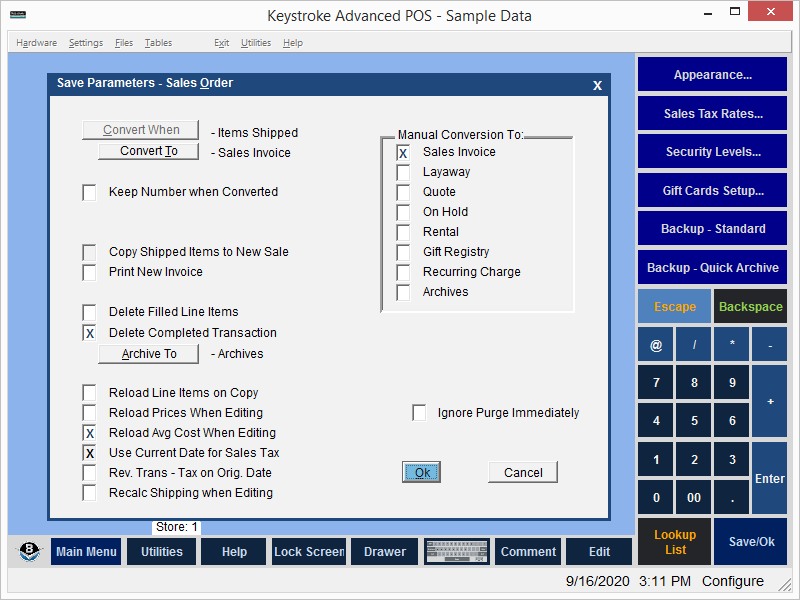
The Sales Transactions Type Save Parameters define what happens with a Sales Transaction when is is completed. Available Save Parameter options vary depending on the Convert When setting selected.
Convert When - Defines if and when to automatically convert to another Transaction Type.
Convert To - Defines the eligible Transaction Types to which conversion is allowed.
Prompt Before Converting - Prompts for confirmation before converting transaction.
Keep Number When Converted - Keep the Transaction Number when converting to another Transaction Type.
Keep Original Clerk - Keep the original Clerk when converting to another Transaction Type.
Don't Save Shipped Qty - Do not save the Quantity Shipped.
Copy Shipped Items to New Sale - Create a new transaction for Shipped Quantities.
Print New Invoice - Print the Invoice after filling a Sales Order.
Delete Filled Line Items - Automatically delete filled line items on the original transaction.
Delete Completed Transaction - Automatically delete the original transaction when all line items are filled.
Archive To - Save a copy of the transaction for record-keeping.
Reload Line Items on Copy - Run the Reload Line Items function when a transaction is copied FROM from Sales Transaction Types that have this parameter enabled.
Reload Prices When Editing - Get current prices from the Inventory database when editing the transaction.
Reload Avg Cost When Editing - Get current costs from the Inventory database when editing the transaction.
Use Current Date For Sales Tax - Use the current date for calculating the sales tax.
Rev Trans - Tax On Orig Date - Use the date of the original transaction when reversing transactions.
Recalc Shipping When Editing - Recalculate shipping amount when editing the transaction.
Ignore Purge Immediately - Override Sales Payment Type Purge Immediately Parameter.
Manual Conversion To - Allow Manual conversion to other transaction types.
See:
Sales Transaction Types
Configuration Manager Contents