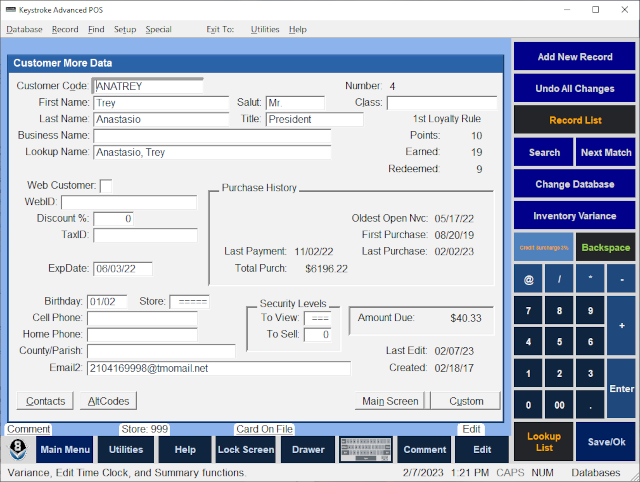
Fields displayed on the Customer - More Data Screen:
Customer Code - A unique identifier for each Customer.
First Name - Customer's first name.
Last Name - Customer's last name.
Business Name - Customer's business name (if applicable).
Lookup Name - Primary Customer look up field.
Salut - Customer's salutation.
Title - Customer's title.
Number - Used internally to identify each record and cannot be changed.
Class - Usage similar to Customer Code.
1st Loyalty Rule - Points - Customer's currently Available Loyalty Points.
1st Loyalty Rule - Earned - Customer's total Earned Loyalty Points.
1st Loyalty Rule - Redeemed - Customer's total Redeemed Loyalty Points.
Web Customer - Option to identify Customer as a Web Customer.
WebID - Customer's Web ID.
Discount % - Default percentage discount on all sales.
TaxID - Seller's Permit or Sales Tax Exemption number.
ExpDate - Used for any type of date associated with the Customer.
Last Payment - Date of Customer's most recent ROA Payment.
Total Purch - Cumulative Sales total.
Oldest Open Nvc - Date of Customer's oldest open invoice in Accounts Receivable.
First Purchase - Date of Customer's first sale.
Last Purchase - Date of Customer's last purchase.
Birthday - Customer's birthday (without birth-year).
Cell Phone - Customer's cell phone number.
Home Phone - Customer's home phone number.
County/Parish - County or Parish name portion of the Customer's address.
Email2 - Customer's secondary email address.
Store - Identifies the Store Number assigned to the Customer.
Security Level - To View - Required Clerk Security Level to view Customer's database record.
Security Level - To Sell - Required Clerk Security Level to sell to the Customer.
Amount Due - Amount currently owed by Customer.
Last Edit - The date the Customer database record was last edited.
Created - The date the Customer database record was created.
Customer Screen Buttons
Contacts - Press [Alt]+[c] to display/edit Customer Contacts.
AltCodes - Press [Alt]+[a] to display/edit Customer Alternate Codes.
Main Screen - Press [Alt]+[n] to display the Main Screen.
Custom Data - Press [Alt]+[u] to display the Custom Data Screen.