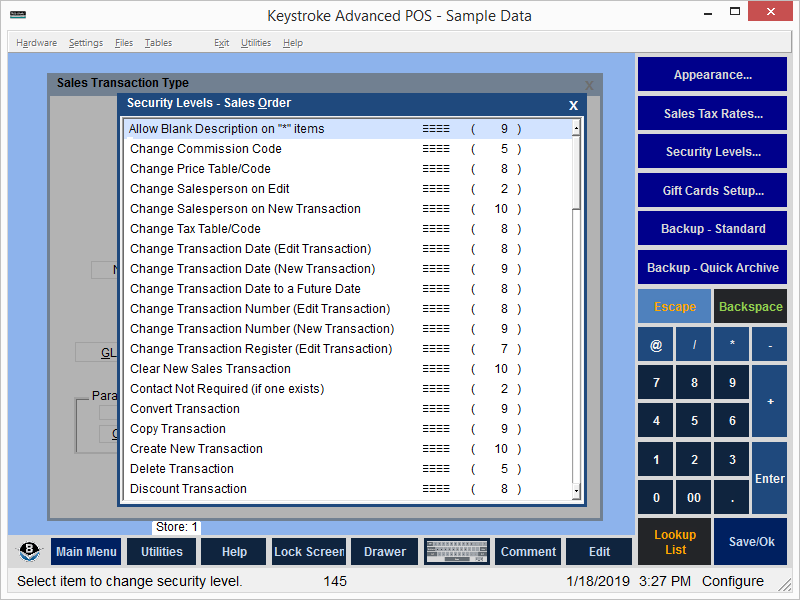
The Security Levels setting defines the Sales Transaction Type security.
Each Sales Transaction Type uses the Default Sales Transactions Security Levels unless overwritten by specific Sales Transaction Type Security Levels.
The Default Security Levels List defines security for all Sales Transaction Types. Select an individual Sales Transaction Type to override the default settings.
To override default Security Levels:
- Select a Sales Transaction Type from the list of Sales Transaction Types.
- Select the Security Level button and choose an item from the Security Levels list.
- Press [Enter] to view the Security Level entry screen.
- Enter the new Security Level.
- Press [Enter]. The new Security Level is displayed in the override column instead of the Null characters.
To restore default Security Levels:
- Select the Security Level button and choose an item from the Security Levels list.
- Press [Enter] to view the Security Level entry screen.
- Press the [Backspace] or [Del] key to clear the security level number.
- Press [Enter] or [F10] to save the setting. The Null characters are displayed in the override column and the setting now uses the default Security Level again.
See:
Sales Transaction Types Setup Screen
Configuration Manager Contents