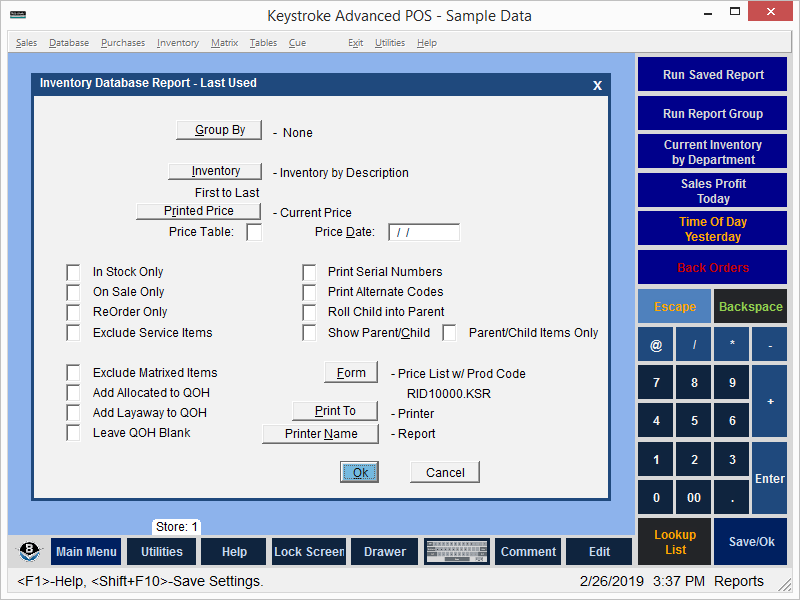
Group By - Displays the Group By Options Screen and determines if the report is grouped and displays group sub- totals.
Inventory - Displays the Inventory Options Screen.
Printed Price - Select the Price field to be printed on the report.
Price Table - Select a Price Table used to determine the price printed on the report.
Price Date - Select the date used to determine the price printed on the report.
In Stock Only - Include information only for items with Quantity On Hand greater than zero.
On Sale Only - Include information only for items designated as On Sale.
ReOrder Only - Include only items for which the Quantity On Hand is below the sum of the Minimum Quantity + the On Order Quantity.
Exclude Service Items - Do not include information for items designated as a Service Item.
Print Serial Numbers - Include Serial Numbers for items that have them.
Print Alternate Codes - Include Alternate Codes for items that have them.
Roll Child into Parent - Combine a Child item with its Parent.
Show Parent/Child - Display the Stock Number of the Parent Item for the Child item.
Parent/Child Items Only - Display only items that have a Parent Item or Child Item.
Exclude Matrixed Items - Do not include information for items with a Matrix Table.
Add Allocated to QOH - Adds the Allocated Qty to the QOH.
Add Layaway to QOH - Adds the Layaway Qty to the QOH.
Use Last Cost - Display Last Cost instead of Average Cost.
Form - Lists the Forms available for use with the current report.
Print To - Print to a Screen, Printer, or File.
See:
Report Manager Contents