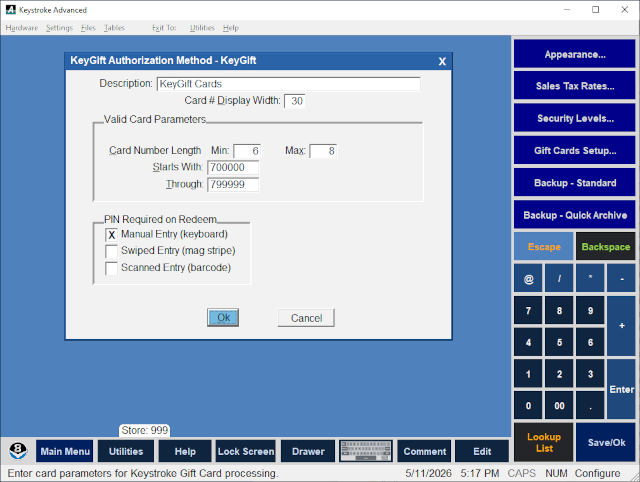
The KeyGift Cards Authorization Method Type provides the ability to manage the Keystroke internal gift card system - KeyGift Cards.
KeyGift Cards are set up in a similar fashion to previous supported gift card systems. The Authorization Method determines how the Gift Cards are to be processed. Set up should include adding the KeyGift authorization method to Gift Card Triggers and to any payments associated with it (the payments should have the standard "Gift Card" Type assigned to them).
KeyGift Card Authorization Method Setup:
- Select Authorization Methods from the Configuration Manager - Tables Menu, then select
KeyGift (or select [Add New Method] to create a new Authorization Method, then enter an appropriate name such as KeyGift).
Description - Used to identify the authorization method.
Card # Display Width - defines the width of the field displaying the gift card number (default is 30).
Card Number Length - The number of characters allowed in the Starts With: and Through: fields are adjusted based on the Card Number Length - Min field.
Starts With: and Through: - The Starts With: and the Through: fields are used to identify the Valid Range of the prefix (i.e. BIN Range) of the cards being used. Gift Cards should always start with a fixed set of numbers to identify them as valid cards for this purpose. The number of characters entered here should normally be 6 digits (but can be up to 11) and always no longer than the card numbers to be used. The actual range should be determined by the Gift Cards purchased through a vendor. Normally cards starting with 700000 through 799999 are safe to use.
PIN Required on Redeem - The Manual Entry (keyboard), Swiped Entry (mag stripe), and Scanned Entry (barcode) parameters can be turned On to control how the correct PIN (usually a number) is entered before the Redeem action proceeds (and also when the card is used as a payment). The KeyGift Card record must have its PIN field populated for this parameter to work. Audit entries are recorded for the delays added to PIN entry when too many incorrect PIN entries are attempted
See:
Authorization Methods
Configuration Manager Contents