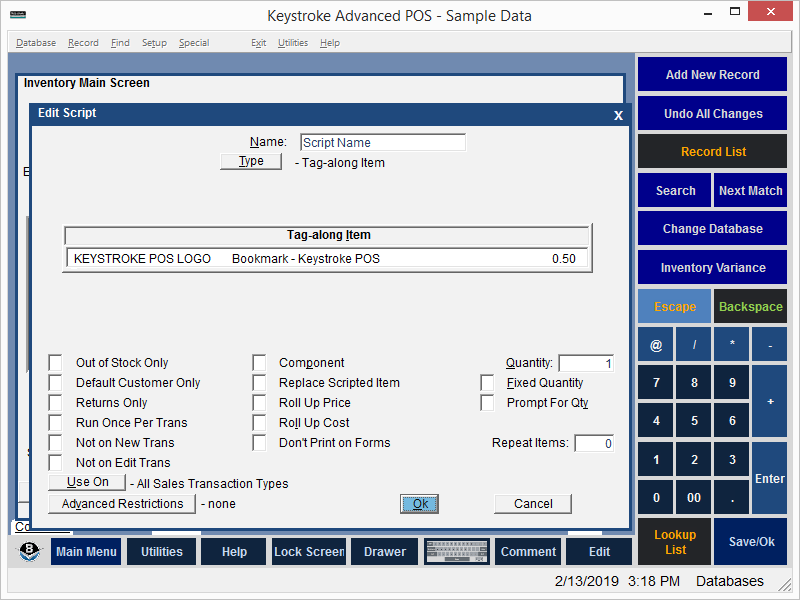
The Tag-along Item Script supplements or replaces the Scripted item with a single item. The Tag-along Item Script can be used to add a supplemental item, build kits, add component items, replace the Scripted Item.
To set up a Tag-along Item:
- Use the Type button to select Tag-along Item.
- Navigate to the Tag-along item field.
- Press [Ins] to display a list of inventory items.
- Select the item from the list and press [Enter].
- Press [F10] or select the [OK] button to save the Script.
Tag-along Item Script Parameters:
Out of Stock Only - run script only if the Scripted Item is out of Stock (QOH<1).
Default Customer Only - run script only if the Customer is the Default Customer (the Default Customer is normally Customer 0 but can be changed in Configuration Manager, under the Settings Menu).
Returns Only - run script only if the quantity ordered/sold is negative (i.e. -1). The quantity must be entered before leaving the line item. Use [Tab] to navigate to the quantity field. Or use the Qty* entry method (-1*ProductCode).
Run Once Per Transaction - run script only once per transaction.
Not on New Trans - do not run script if the transaction is new.
Not on Edit Trans - do not run script if the transaction is being edited.
Component - selected item will not have a selling price.
Replace Scripted Item - selected item replaces Scripted Item.
Roll Up Price - add selected item price to Scripted Item price.
Roll Up Cost - add selected item cost to Scripted Item cost.
Don't Print on Forms - do not print selected item on printed Forms (it will appear on the screen and on reports).
Quantity - quantity of selected item to add to transaction.
Fixed Quantity - use selected item Quantity regardless of the Scripted Item quantity.
Prompt for Qty - prompts the Clerk to enter the Quantity.
Repeat Items - how many times should the selected item be entered per Scripted Item (Total = Repeat Items x Quantity).
[Use On] - select the Transaction Type (or All Types) on which the script will run.
*[Advanced Restrictions] - run script only within any of the following restrictions (any of which may be combined): Date Range, Time Of Day, Day Of Week, Day Of Month, Min Qty, Max Qty, Check All Line Items, Script Filter.
* - requires Keystroke Advanced license.
See:
Scripts Contents